
Why is my AWS bill so high?
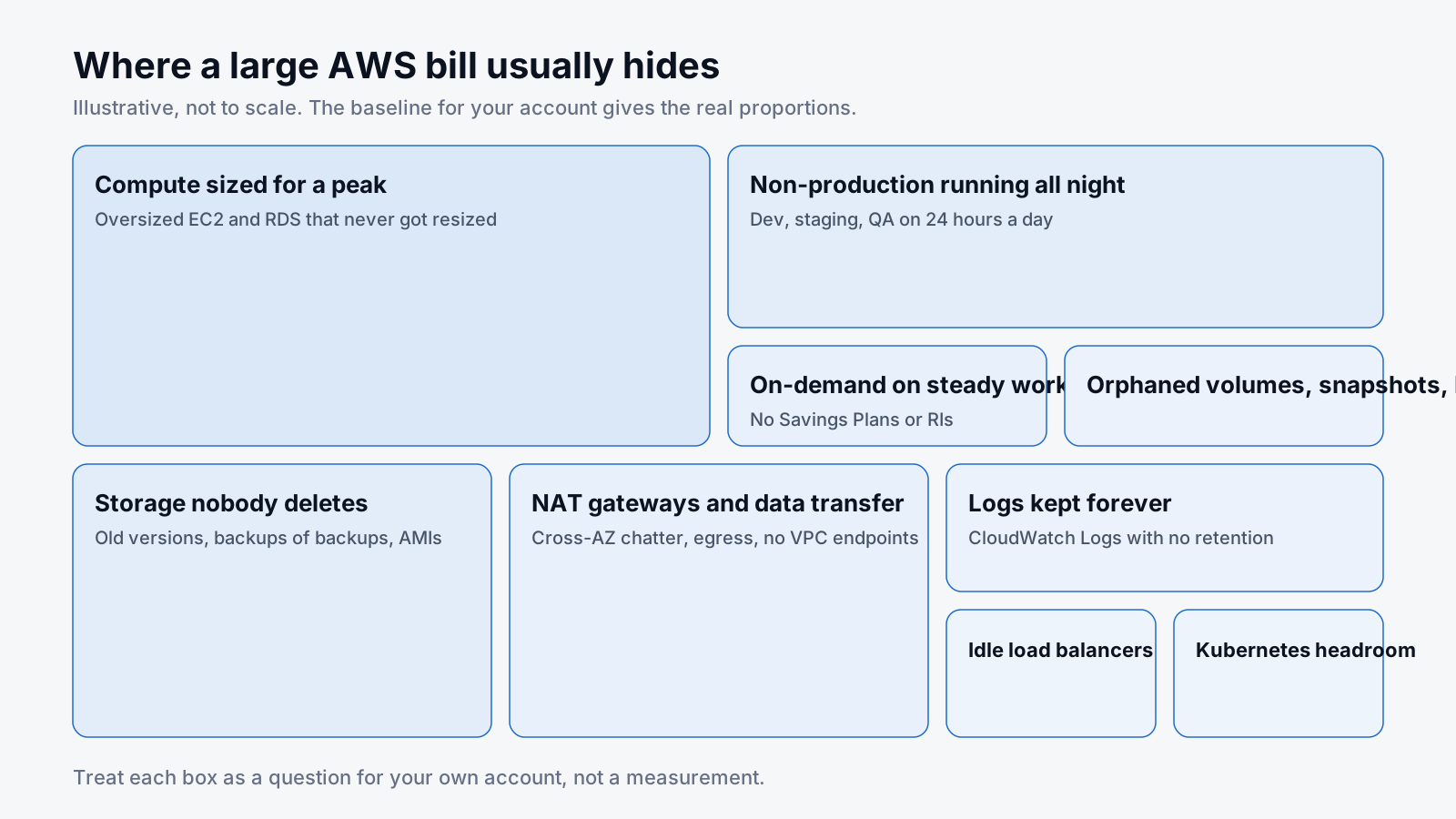
It's the question behind most of the cloud cost optimization work we do, usually followed by "how to reduce AWS bill without breaking anything", and the answer is nearly always the same handful of causes:
- Resources outlive the project. Instances, databases, load balancers and volumes spun up for a feature, a test or a migration, still running long after the work shipped.
- Non-production runs 24 hours a day. Dev, staging and QA sized like production and left on overnight and all weekend, serving nobody.
- Capacity sized for a peak. Picked for a launch or a scary week, never resized when the week ended.
- Storage never gets deleted. Snapshots, old log groups, S3 object versions, backups of backups. Deleting feels riskier than paying, so nobody deletes.
- Data travels further than it needs to. Cross-AZ chatter, NAT gateways, internet egress. None of it shows on the architecture diagram.
- No line item has an owner. Without tags and a sensible account structure, no team sees its own spend, so nobody acts.
- Discounts never bought, or bought wrong. On-demand pricing on workloads that haven't changed in a year, or a three-year Reserved Instance on an instance size that was wrong to begin with.
None of these is dramatic. That's why they survive every budget review.
Cloud cost optimisation strategies: three passes
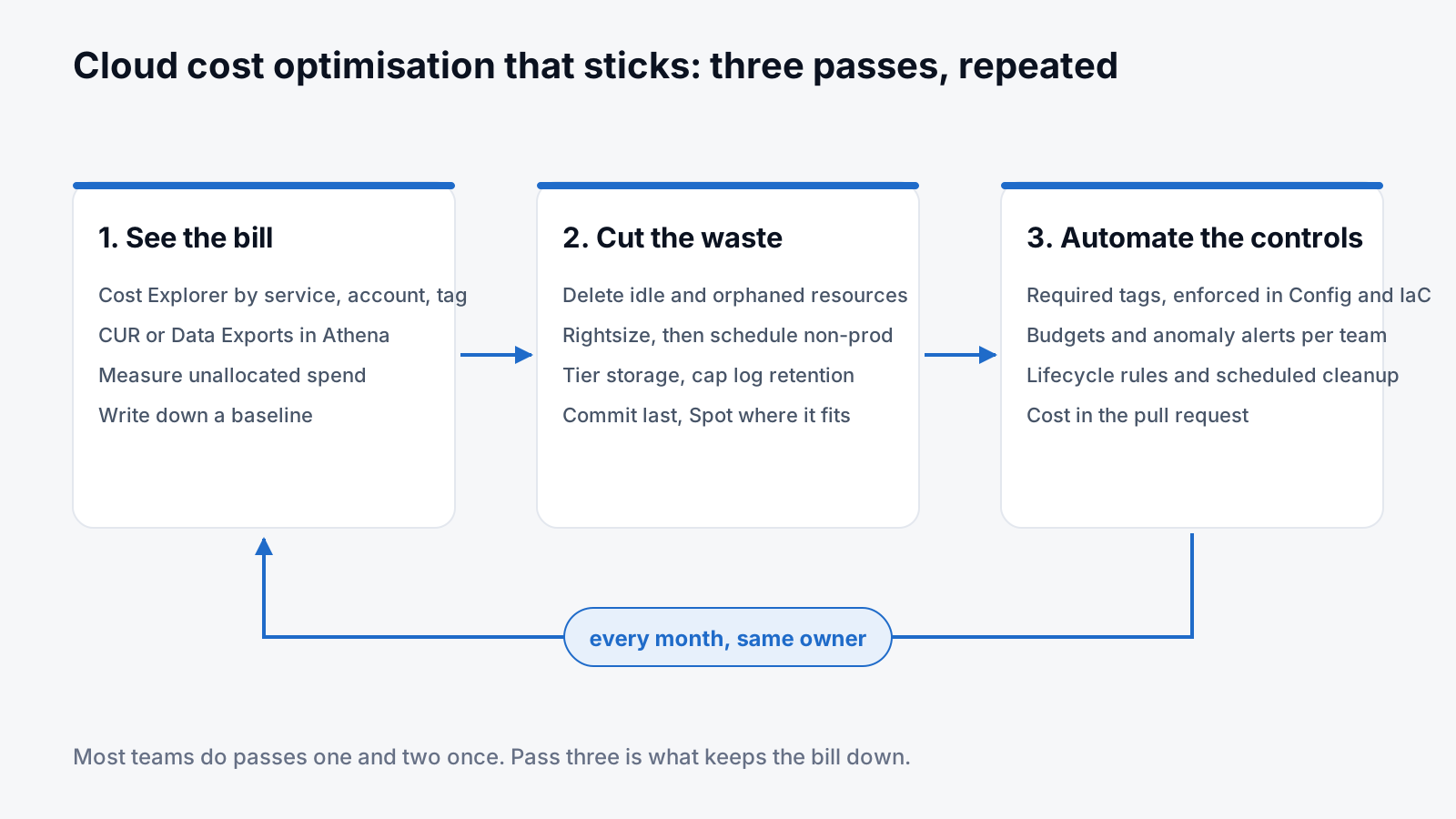
Every cloud cost management approach that actually works boils down to the same loop. See the bill, cut the waste, automate the controls, then do it again next month with the same owner. Most teams do the first two once. The third is what keeps the bill down.
Pass one: find where the money goes
Resist the urge to start deleting. Make the bill readable first.
- AWS Cost Explorer, grouped by service, then linked account, then tag. Find your top five services. On most accounts a handful dominate: EC2, RDS, S3, data transfer and EBS, with EKS, CloudWatch and NAT gateways not far behind.
- Turn on the AWS Cost and Usage Report (CUR, now part of Data Exports) into S3 and query it with Athena if the account is big. Cost Explorer is a summary; the CUR is the truth, down to individual resource IDs.
- Activate AWS cost allocation tags for owner, environment and product, and measure what's left unallocated. Untagged spend is unowned spend, and it goes first on the list.
- Write down a baseline. A full month by service and environment, with the usage behind it. Every change you make later is measured against this, so savings are evidence rather than vibes.
- Open AWS Cost Optimization Hub, Compute Optimizer and Trusted Advisor. They don't catch everything, but they're free and they hand you a starting list of idle resources, rightsizing candidates and commitment recommendations.
A query like this against the CUR is a decent first look at where unowned spend sits:
SELECT line_item_product_code,
       resource_tags_user_owner,
       SUM(line_item_unblended_cost) AS cost
FROM cur
WHERE year = '2026' AND month = '9'
GROUP BY 1, 2
ORDER BY cost DESC
LIMIT 50;
Pass two: 14 ways to reduce AWS costs
Roughly in order of payoff for effort on the accounts we see. Yours will differ; the baseline tells you where to start.
1. Delete what nobody is using
Unattached EBS volumes. Snapshots of volumes that no longer exist. Load balancers with no healthy targets. Public IPv4 addresses sitting idle (AWS charges for those now). Stopped instances still paying for their disks. Empty EKS clusters. OpenSearch domains nobody queries. This is the cheapest money you will ever save, and it needs three things: a list, an owner and a deletion date.
# Volumes attached to nothing, with size and age
aws ec2 describe-volumes --filters Name=status,Values=available \
  --query 'Volumes[].{id:VolumeId,gb:Size,created:CreateTime}' --output table
2. Rightsize EC2 before anything else
Put CloudWatch CPU, memory (you need the agent for memory) and network next to the instance size. Compute Optimizer does most of the maths. Do it before buying any commitment, or you'll lock in the oversized footprint for a year.
3. Switch non-production off when nobody's working
If dev and staging only run during working hours, you save most of their cost without touching production. Instance Scheduler on AWS, a Lambda on an EventBridge cron, or simply destroying whole environments defined in Terraform all work. Make "off" the default and "on" the exception.
# EventBridge schedules: stop the dev environment at 19:00, start at 07:30, Mon to Fri
StopDev:  cron(0 19 ? * MON-FRI *)
StartDev: cron(30 7 ? * MON-FRI *)
4. Move to current-generation and Graviton instances
Newer families give better price-performance, and Graviton (Arm) instances are cheaper for the same work wherever your software supports it, which is most Linux workloads, managed databases and container images these days. One change, paid back every month.
5. Tier S3 and fix EBS
S3 lifecycle rules to move objects to Infrequent Access or Glacier classes, expire old versions, and abort incomplete multipart uploads (which quietly cost money). Intelligent-Tiering where you honestly don't know the access pattern. Migrate EBS from gp2 to gp3: cheaper per gigabyte, and IOPS and throughput are set separately. Give snapshots and AMIs a retention policy.
{
  "Rules": [{
    "ID": "logs-tier-and-expire",
    "Filter": { "Prefix": "logs/" },
    "Status": "Enabled",
    "Transitions": [{ "Days": 30, "StorageClass": "STANDARD_IA" },
                    { "Days": 90, "StorageClass": "GLACIER_IR" }],
    "Expiration": { "Days": 400 },
    "AbortIncompleteMultipartUpload": { "DaysAfterInitiation": 7 }
  }]
}
6. Reduce RDS costs
Idle or oversized instances, provisioned IOPS nobody needed, Multi-AZ on databases that aren't production, read replicas created during an incident and never removed, and backups retained far beyond the recovery point anyone actually requires. Graviton instance classes and gp3 storage apply here too. For spiky workloads, Aurora Serverless can replace an always-on instance sized for the busiest hour of the year.
7. Reduce data transfer costs
Cross-AZ traffic is billed in both directions, so chatty services spread across zones add up. Keep them together where resilience allows, put CloudFront in front of anything served to the internet repeatedly (transfer from CloudFront is cheaper than straight from EC2 or S3), and compress what you send.
8. Reduce NAT gateway costs
NAT gateways bill per hour and per gigabyte processed, and a surprising amount of that traffic is your own services talking to S3, DynamoDB or ECR. Gateway VPC endpoints for S3 and DynamoDB carry no data processing charge; add interface endpoints for other AWS services you hit hard. The VPC Flow Logs for the NAT's network interface will tell you who the big talkers are.
9. Reduce CloudWatch costs
Logs ingestion and storage, custom metrics and high-resolution alarms all scale with volume, not value. Set a retention period on every log group (the default is "never expire"), filter debug noise before it's ingested, use the Infrequent Access log class for logs you keep for audit rather than debugging, and ask who actually looks at each dashboard.
# Log groups with no retention set, i.e. kept forever
aws logs describe-log-groups --query 'logGroups[?!retentionInDays].logGroupName'
10. Reduce AWS Config costs
AWS Config charges per configuration item recorded, so busy accounts with continuous recording of every resource type can run up a real bill, especially with Kubernetes or autoscaling churn. Record only the resource types your rules and audits need, and switch non-critical types to daily (periodic) recording.
11. Kubernetes cost optimization on EKS
On EKS you pay for node hours, not pod usage. Compare container requests with real usage, set requests honestly, let Karpenter or the cluster autoscaler size nodes to demand, and put tolerant workloads on Spot. Something that maps spend to namespaces (OpenCost is free) makes it visible to the teams who own the workloads, which is when it starts to improve.
12. AWS Savings Plans vs Reserved Instances
Both discount steady usage in exchange for a one- or three-year commitment. How do AWS Savings Plans work? You commit to a fixed amount of compute spend per hour, and anything up to that amount is billed at the discounted rate. Compute Savings Plans apply across EC2 families, regions, Fargate and Lambda; EC2 Instance Savings Plans and Reserved Instances discount a bit more but tie you to a family or region. Reserved Instances are still the only commitment option for RDS, ElastiCache, OpenSearch and Redshift. Buy after rightsizing and scheduling, cover a conservative share of the baseline, and check coverage and utilisation monthly. Over-committing is a very expensive way to feel organised.
13. Use Spot for anything that can be interrupted
Batch jobs, CI runners, data processing, rendering, stateless workers. All fine on Spot at a large discount from on-demand, as long as you design for interruption: checkpoints, several instance types, and no stateful or latency-sensitive services.
14. Change the architecture when the bill tells you to
Some costs are structural. A service that polls instead of listening to events. A cache that never got added. A job running hourly when daily would do. A monolith sized for its busiest endpoint. These take longer and belong on the roadmap, but they're what keeps a bill flat while usage grows.
The same approach on Azure and Google Cloud
The mechanics transfer almost one to one. On Azure, Cost Management and Advisor stand in for Cost Explorer and Compute Optimizer, Reservations and Azure savings plans for Savings Plans, and blob lifecycle management for S3 lifecycle rules. On Google Cloud it's Billing reports and Recommender for finding idle and oversized resources, committed use discounts for steady workloads, and Autoclass or lifecycle rules on Cloud Storage. The order of work is identical: visibility, waste, rightsizing, scheduling, commitments, architecture.
Cloud cost optimisation tools worth using
You don't need to buy anything to start. A sensible toolbox, most of it free:
| Tool | What it's for | Cost |
|---|---|---|
| AWS Cost Explorer | Spend by service, account and tag | Free in the console |
| Cost and Usage Report + Athena | Line-item truth, per resource | S3 and Athena query costs |
| AWS Cost Optimization Hub | Idle resources, rightsizing and commitment ideas in one list | Free |
| AWS Budgets and Cost Anomaly Detection | Alerts on thresholds and unexpected jumps | Free tier, then small |
| Compute Optimizer | Rightsizing for EC2, EBS, Lambda, RDS | Free basic tier |
| OpenCost | Kubernetes cost by namespace and workload | Open source |
| Infracost | Cost estimate on every Terraform pull request | Open source CLI |
| Cloud Custodian | Policies that find and clean up waste on a schedule | Open source |
Commercial FinOps platforms earn their keep once you have many accounts, several clouds or showback to lots of teams. Buy a tool to support a practice, not instead of one.
Cloud cost optimisation best practices: prioritise by value, effort and risk
Not every finding deserves action. For each one, estimate the monthly saving, the effort to do it and the operational risk, then sort.
- Quick wins: idle resources, retention policies, scheduling, gp3, log retention. Low effort, low risk, start this week.
- Planned changes: rightsizing production, Graviton, NAT and endpoint changes, Kubernetes requests. These need a test window and a named owner.
- Commitments: once the first two groups have settled the baseline, so you commit to the right footprint.
- Architecture: on the roadmap, justified by the line item it removes.
Measure every change against the baseline and watch latency, error rates and headroom while you do it. A saving that degrades the service isn't a saving, it's a cost you've moved somewhere less visible.
Pass three: automate it so the bill doesn't creep back
Most teams can cut a bill once. Keeping it down is the hard part, because every habit that created the waste is still there. This is the pass people skip, and it's why the same account gets "optimised" again eighteen months later.
Enforce tagging
Pick a small set of required tags (owner, environment, product, cost centre), enforce them with Organizations tag policies and the required-tags AWS Config rule, and fail the Terraform plan when they're missing.
variable "tags" {
  type = map(string)
  validation {
    condition     = alltrue([for k in ["owner", "env", "product"] : contains(keys(var.tags), k)])
    error_message = "owner, env and product tags are required."
  }
}
Budgets and AWS cost anomaly detection
AWS Budgets per account, team or service, with alerts at thresholds that mean something, plus Cost Anomaly Detection for the sudden jumps budgets miss. Send the alert to the channel of the team that owns the spend. A shared finance inbox is where cost alerts go to die.
Make cleanup a scheduled job
Lifecycle rules for S3 and snapshots. Scheduled stop and start for non-production. A job (Cloud Custodian or a small Lambda) that deletes anything whose expires tag has passed. A weekly report of unattached volumes and idle load balancers. If a human has to remember it, it will be forgotten by March.
Put cost in the pull request
Estimate the cost of infrastructure changes at review time with Infracost, enforce instance family and size policies as code, and require a one-line justification for anything above a threshold. Review cost the way you review security: before merge, not after the invoice.
Keep rightsizing and commitments on a calendar
Recommendations refresh continuously; somebody has to read them. A monthly slot for rightsizing candidates, Savings Plan coverage and utilisation, and anything about to expire. Half an hour, same owner, every month.
Give every line item an owner
Show each team its own spend, dashboards or a monthly report, and make the trend part of their regular reviews. That's the core of FinOps: engineering, finance and product sharing responsibility for cloud spend. It matters more than any tool you could buy.
When to bring in cloud cost optimisation services
If the account is large, the team is flat out and nobody has owned cost before, an outside review is usually faster than finding the time internally. Decent cloud cost optimisation services do four things: analyse billing and usage data against the actual resources, produce a prioritised list with estimated savings, effort and trade-offs, implement what you approve, and measure the result against an agreed baseline while watching performance. They should also leave you with the budgets, alerts and ownership described above, so the bill stays down after they've gone.
That's how our AWS cost optimization service works, and you can pay for it two ways: a fixed fee where you keep every dollar saved, or nothing up front and a share of the verified saving for a limited period. For Azure and Google Cloud, see FinOps and cloud cost optimisation. Teams that want the operations side looked after too usually pair it with managed DevOps, or take the Secure SaaS Growth Bundle, which includes both. If you're still deciding whether an outside team makes sense at all, this guide to DevOps managed services covers that question.