Autostat

DevOps maturity assessment: score your setup in 10 minutes

A model with five levels, the DORA metrics that put numbers on them, an interactive questionnaire, what good looks like area by area, and the order we'd fix things in. Written by people who do this for a living, so expect opinions.

Source code on a computer monitor
The code is usually fine. The way it gets to production is the part nobody has looked at since the first hire left. Photo: Ilya Pavlov, Unsplash.

What a DevOps maturity assessment measures

Strip out the consulting vocabulary and a DevOps maturity assessment asks four questions:

  1. How does a change get to production, and how much of that path is automated and reviewed?
  2. Can you rebuild production from code, or is it a snowflake somebody built in a console?
  3. How do you find out something is wrong, and how fast can you fix it?
  4. Who can do all of the above, and what happens when they're on holiday?

Everything else (security hygiene, cost control, documentation) hangs off those four. A good assessment produces a level, a list of specific gaps, and an order to fix them in. A bad one produces a radar chart and a quote.

It's also worth saying what it doesn't measure. It won't tell you whether your architecture is right, whether your tests are any good, or whether the team is happy. It's about the delivery and operations machinery, which is the part that quietly decides how fast everything else can move.

DORA metrics and DevOps KPIs: the numbers behind the levels

The DORA metrics come from years of the State of DevOps research and they're the closest thing the industry has to agreed DevOps KPIs. Four of them, plus a fifth that got added later:

  • Deployment frequency: how often you ship to production. Daily or on demand at the top; monthly or "when the release is ready" at the bottom.
  • Lead time for changes: time from a commit being merged to it running in production. Hours at the top; weeks at the bottom.
  • Change failure rate: the share of deployments that cause a problem needing a fix, rollback or patch.
  • Time to restore service: how long an incident takes to resolve once it's noticed.
  • Reliability (added later): whether you meet whatever availability and performance targets you've set.

You don't need a tool to start. If you deploy through GitHub Actions, your deployment frequency and a rough change failure rate are a query away:

# Production deploys in the last 100 runs of the deploy workflow, and how many failed
gh run list --workflow deploy.yml --branch main --limit 100 \
  --json conclusion,createdAt \
  --jq '[.[] | select(.conclusion=="success")] | length as $ok
        | "ok: \($ok)  failed: \(100 - $ok)  first: \(.[-1].createdAt)  last: \(.[0].createdAt)"'

Track them monthly, roughly, by hand if necessary. The point isn't precision; it's noticing that lead time doubled after the new approval step was added, or that half of all incidents follow a Friday deploy.
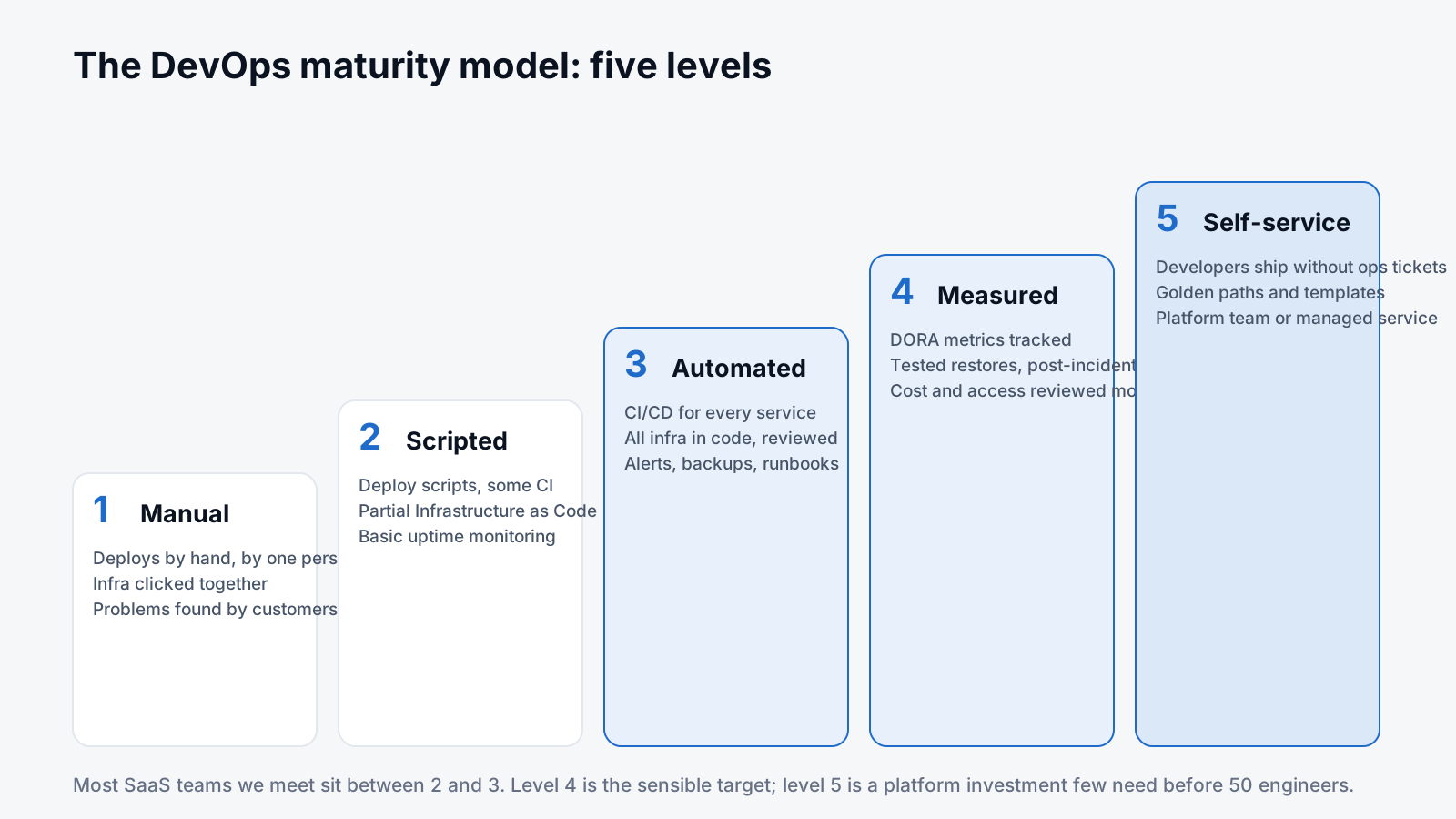
Diagram of the five DevOps maturity levels as rising steps: manual, scripted, automated, measured, self-service
Level 4 is the sensible target for most SaaS companies. Level 5 is a platform investment that pays off at a certain team size, not before.

The DevOps maturity model: five levels

There are dozens of DevOps maturity models (Gartner has one, so does every consultancy). They all describe the same climb. Here's the version we use, with the DevOps maturity levels described by what you'd actually see on a Tuesday afternoon.

LevelWhat it looks likeTypical DORA profile
1. ManualOne person deploys by hand. Infrastructure was clicked together. Customers report outages.Monthly deploys, weeks of lead time, restore measured in days
2. ScriptedDeploy scripts and some CI. Parts of the infrastructure in code. Basic uptime monitoring.Weekly deploys, lead time in days, incidents found by the team, sometimes
3. AutomatedCI/CD for every service. All infrastructure in reviewed code. Alerts, backups, runbooks exist.Daily deploys possible, lead time in hours, restore in hours
4. MeasuredDORA metrics tracked. Restores tested. Post-incident reviews with actions. Access and cost reviewed monthly.On-demand deploys, low change failure rate, restore under an hour
5. Self-serviceDevelopers ship without an ops ticket. Golden paths and templates. A platform team, or a managed service playing that role.Same as 4, sustained as the team grows

Level 5 is where platform engineering lives: a team whose product is the internal platform the other engineers build on. It's the right answer at a certain size and an expensive distraction before it. Most of the value is captured at level 4.

Run the DevOps assessment questionnaire

Twenty-five statements, five areas, about ten minutes. It's the same DevOps assessment questionnaire we use on a first call, minus the follow-up questions. Answer for your main production system, not your best one.

DevOps maturity self-assessment

Twenty-five statements across five areas. Score honestly: "Partly" means it's true for some services or some of the time. Your answers stay in your browser.

Delivery pipeline

Every service builds and deploys through CI/CD; nobody deploys from a laptop.

A change can reach production in under a day without a special meeting.

Automated tests gate the pipeline and a failing test actually blocks the release.

Rolling back a bad release is a known, practised step, not an improvisation.

Deployments happen during working hours because they are boring.

Infrastructure

All cloud infrastructure is defined in code (Terraform, CloudFormation, Pulumi or similar).

Infrastructure changes go through pull requests with a plan output someone reads.

Staging matches production closely enough that it catches real problems.

A new environment can be created from code without hand-editing anything in a console.

Secrets live in a secrets manager, not in repos, CI variables or Slack.

Operations and reliability

Monitoring covers the user-facing symptoms (errors, latency, saturation), not just CPU.

Alerts page a named person and the noisy ones have been fixed or deleted.

Backups are automatic and a restore has been tested in the last six months.

Incidents get a written post-incident review with follow-up actions that get done.

Runbooks exist for the top five operational tasks and incidents.

Security and access

MFA is enforced on cloud consoles, source control and anything reaching production.

Nobody uses shared accounts or long-lived root credentials.

Dependencies and container images are scanned and patched on a cadence.

Production access is granted by role and reviewed periodically.

Audit logs for cloud and auth are retained somewhere tamper-resistant.

Cost and ownership

Every resource carries owner and environment tags and the bill is reviewed monthly.

Non-production environments are switched off outside working hours or sized well below production.

Someone owns each service and knows how it is deployed and recovered.

At least two people can deploy and operate every critical service.

Delivery metrics (deployment frequency, lead time, failures, time to restore) are tracked, even roughly.

DevOps best practices: what good looks like in each area

The questionnaire tells you where you are. This is what "Yes" looks like in each area, with the DevOps best practices that actually move the score, and a couple of snippets because a description is never as clear as the config.

What good looks like, area by area

CI/CD

CI/CD best practices that matter more than the tool you pick:

  • One pipeline definition per service, in the repo, reviewed like code.
  • Build once, promote the same artefact (image, bundle) through environments. Never rebuild for production.
  • Tests run in the pipeline and a red build blocks the merge. Flaky tests get fixed or deleted, not retried forever.
  • Deploy on merge to main for most services; a manual approval step only where a regulator or a customer contract needs it.
  • Rollback is a pipeline button or a git revert, practised before you need it.
# The shape of a GitHub Actions deploy job: build once, deploy the digest
jobs:
  build:
    runs-on: ubuntu-latest
    outputs: { digest: ${{ steps.push.outputs.digest }} }
    steps:
      - uses: actions/checkout@v4
      - id: push
        uses: docker/build-push-action@v6
        with: { push: true, tags: ghcr.io/acme/api:${{ github.sha }} }
  deploy:
    needs: build
    environment: production
    steps:
      - run: ./deploy.sh ghcr.io/acme/api@${{ needs.build.outputs.digest }}

Infrastructure as Code

Infrastructure as Code best practices, in the order they pay off:

  • Everything in production is in Terraform (or OpenTofu, Pulumi, CloudFormation). If it was clicked in a console, it gets imported or rebuilt.
  • Remote state with locking, one state per environment, and terraform plan output posted on every pull request.
  • Modules for the things you repeat (a service, a database, a bucket with sane defaults). Not a module for everything.
  • Drift detection on a schedule, so console changes get noticed within a day.
  • Required tags enforced in code, so cost and ownership never go missing.
terraform {
  backend "s3" {
    bucket         = "acme-tfstate"
    key            = "prod/network.tfstate"
    region         = "eu-west-1"
    dynamodb_table = "acme-tfstate-lock"
    encrypt        = true
  }
}

Observability

Monitor what users feel, then what explains it.

  • Four signals per service: request rate, errors, latency, saturation. Dashboards start there.
  • Alerts on symptoms (error rate, p95 latency, queue age), not on causes (CPU 80%). Every alert has a runbook link and a named responder.
  • Structured logs with a request ID that follows the request across services.
  • Log retention set everywhere; debug noise filtered before it is paid for.
  • An uptime check from outside your network, because internal monitoring can't see a DNS or TLS failure.

Backups and recovery

A backup you've never restored is a hope, not a backup.

  • Automated, encrypted backups for every stateful thing: databases, object storage with versioning, config and secrets.
  • Restore tested on a schedule, timed, and written down (restore time is your real recovery time objective).
  • Backups in a different account or region from the thing they protect, so one compromised credential can't delete both.
  • Infrastructure rebuildable from code, so recovery is "apply, restore data" rather than archaeology.

Security basics

The hygiene a SOC 2 auditor or an enterprise security questionnaire will ask about:

  • MFA and SSO everywhere, no shared accounts, root credentials locked away.
  • Least-privilege roles for humans and for CI; short-lived credentials (OIDC from the pipeline to the cloud, not static keys).
  • Secrets in a secrets manager, rotated, never in repos.
  • Dependency and image scanning in the pipeline, with a patch cadence you keep.
  • Cloud and auth audit logs retained centrally.

If you're heading for an audit, our SOC 2 guide maps these to what gets tested.

Cost

Cost is an operations metric, not a finance one.

  • Owner, environment and product tags on everything, enforced in code.
  • Non-production off outside working hours, or sized far below production.
  • Budgets and anomaly alerts routed to the team that owns the spend.
  • Rightsizing and commitments reviewed monthly, after rightsizing.

The long version is in the cloud cost optimisation guide.

A DevOps roadmap from level 2 to level 4

The most common question after an assessment is "fine, but what first?" Here's the DevOps roadmap we'd follow for a typical SaaS team at level 2. It is deliberately boring. The order matters more than the speed.
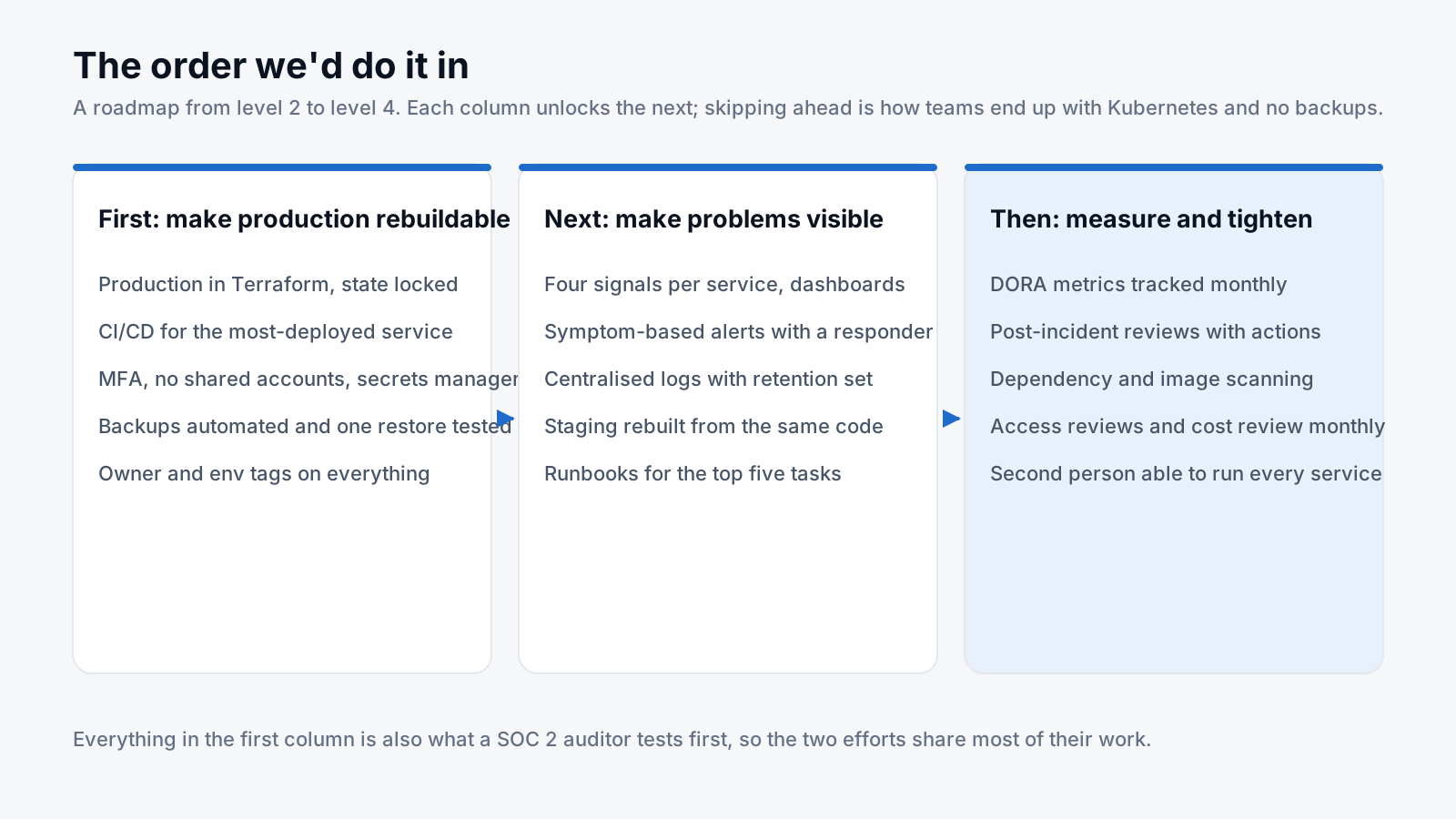
Three-column roadmap: first make production rebuildable, next make problems visible, then measure and tighten
Each column makes the next one possible. Teams that skip to the third end up with dashboards for infrastructure nobody can rebuild.

First: make production rebuildable. Production infrastructure in Terraform with locked remote state. CI/CD for the service you deploy most. MFA everywhere, no shared accounts, secrets in a secrets manager. Automated backups with one restore tested and timed. Owner and environment tags on everything. This column is also most of what a SOC 2 auditor tests first, which is why we tell teams heading for an audit to start here.

Next: make problems visible. Four signals per service on a dashboard. Alerts on symptoms with a named responder. Centralised logs with retention set. Staging rebuilt from the same code as production. Runbooks for the five things that happen most.

Then: measure and tighten. DORA metrics tracked monthly. Post-incident reviews that produce actions somebody does. Dependency and image scanning in the pipeline. Access reviews and a cost review on the calendar. A second person able to deploy and operate every critical service.

Three columns, no dates, because the time each takes depends on how much of your infrastructure was clicked together and how many services you run. A team with one monolith and a database can get through the first column quickly. A team with twenty microservices and three clouds can't, and shouldn't pretend otherwise.

The short DevOps checklist

If you only fix ten things, this is the DevOps checklist we'd hand you after the assessment:

  1. Every production deploy goes through a pipeline, never a laptop.
  2. All production infrastructure is in code with a plan reviewed on every change.
  3. MFA on cloud, source control and anything with production access.
  4. Secrets in a secrets manager; none in repos or CI variables.
  5. One restore tested and written down, with the time it took.
  6. Alerts on error rate and latency that page a named person.
  7. Log retention set on every log group.
  8. Runbooks for the top five operational tasks.
  9. Owner and environment tags on everything; the bill reviewed monthly.
  10. At least two people who can deploy and recover each critical service.

DevOps audit vs health check vs maturity assessment

Three names that get used interchangeably and shouldn't be. A DevOps audit is the compliance-flavoured one: checking that your delivery process matches a policy or standard, often with an auditor in the room, and it produces findings. A DevOps health check is a quick, usually free look at a pipeline or a cloud account to spot obvious problems; vendors use it as a door-opener and it's fine as long as you know that. A DevOps maturity assessment is the broad one: where you are across delivery, infrastructure, operations, security and cost, and what to do next. If someone sells you an "Azure DevOps health check", be aware they probably mean the Microsoft product (Azure DevOps Services, pipelines and boards), not your DevOps practice in general.

DevOps for SaaS: the traps that generic models miss

DevOps for SaaS has a few problems that a generic maturity model glosses over:

  • Multi-tenancy makes every incident a customer incident. A noisy neighbour, a migration that locks a shared table, a cache that's shared across tenants. Your monitoring needs a per-tenant view, and your runbooks need a "which customers are affected" step.
  • Deploy windows get negotiated away. Enterprise customers ask for change freezes and notice periods. The answer is small, frequent, boring deploys with a tested rollback, not a monthly release train that makes every deploy scary.
  • Security questionnaires arrive before you're ready. The first big customer will ask about backups, access control and SOC 2. Everything in the first roadmap column is your answer; do it before the questionnaire, not during.
  • Costs scale with customers, not usage. Per-tenant resources (databases, buckets, queues) multiply quietly. Tagging by tenant or product from the start is the only way to see it. The cloud cost optimisation guide covers what to do when it's already got away from you.

Where managed DevOps services fit

Some teams run the assessment, read the roadmap, and do it themselves. Good. Others look at the first column and realise nobody has time for it between feature work and the on-call rota. That's the gap managed DevOps services exist for: an outside team that builds the pipeline, infrastructure and monitoring, then operates them under agreed hours and responsibilities, so the level goes up and stays up. We wrote a separate guide on what DevOps managed services include and how to choose a provider.

One distinction worth knowing, because the search results blur it: "AWS managed services" usually refers to either AWS Managed Services (AMS), Amazon's own enterprise operations offering, or to AWS's managed products like RDS and EKS. Neither is the same as a managed DevOps provider working in your account. RDS manages the database engine; nobody at AWS is going to notice your backups were never restore-tested or that the deploy pipeline depends on Dave.

If you want an outside view, our fixed-price DevOps assessment is this exact framework run on your real pipelines, accounts and alerts with read-only access: one week, a written score per area, a DORA baseline, the AWS waste priced per month and a 90-day plan. If you then want help with the work, the managed DevOps plans pick up from that plan, and the pricing page lists what each one costs. SaaS teams that also need cost control and SOC 2 readiness tend to take the Secure SaaS Growth Bundle.

Frequently asked questions

What is a DevOps maturity model?

A DevOps maturity model describes stages a team moves through as its delivery and operations practices improve, usually from manual deployments and hand-built infrastructure up to automated, measured, self-service delivery. Models differ in labels and level counts, but all of them track the same things: automation of the path to production, infrastructure defined in code, observability, recovery and the spread of operational knowledge across the team.

What are the DORA metrics?

Deployment frequency, lead time for changes, change failure rate and time to restore service, with reliability added as a fifth. They come from the DevOps Research and Assessment programme's yearly State of DevOps reports and are the most widely used DevOps KPIs because they measure outcomes (how fast and how safely you deliver) rather than activity.

How often should we reassess DevOps maturity?

Twice a year is plenty for the full assessment. Track the DORA metrics monthly in between; they'll tell you when something has regressed long before a questionnaire does. Reassess sooner after big changes: a new platform, a merger, a key engineer leaving.

What's the difference between a DevOps audit and a DevOps maturity assessment?

An audit checks your process against a defined policy or standard and produces findings, often for a compliance purpose. A maturity assessment is broader and forward-looking: it places you on a scale across delivery, infrastructure, operations, security and cost, and produces a roadmap rather than a list of non-conformities.

Is an Azure DevOps maturity assessment the same thing?

Usually not. "Azure DevOps" is a Microsoft product (repos, pipelines, boards), so an Azure DevOps maturity assessment typically means how well you use that product. The assessment in this guide is about your delivery and operations practice regardless of tooling, and applies whether you use Azure DevOps, GitHub, GitLab or something else.

Do we need platform engineering?

Not until developers are waiting on an operations team for routine things and the team is large enough that a shared internal platform saves more time than it costs. Below that size, level 4 practices plus a managed DevOps service or a strong senior engineer cover the same ground.

What maturity level do we need for SOC 2?

There's no official mapping, but a Type 2 audit effectively tests the first roadmap column: pipeline-based deployments with review, infrastructure in code, MFA and access control, logging, tested backups. Teams at a solid level 3 find the technical side of SOC 2 is mostly evidence collection; teams at level 1 or 2 have engineering work to do first.

What does DevOps support cover?

DevOps support normally means ongoing operation of the delivery and infrastructure layer within agreed hours: pipeline and infrastructure maintenance, upgrades, monitoring and incident response, backups and recovery, and keeping runbooks current. Coverage, responsibilities and escalation should be written into the agreement rather than implied by a "24/7" on a website.

Want us to run the assessment properly?

Send us your score and your stack. We'll do a read-only review of how code reaches production, how infrastructure is defined and how you find out about problems, then propose what to fix first, with coverage, responsibilities and price in writing.